


How Modern Screens Affect Your Eyes Over Time
Screens are no longer a lifestyle choice. They are woven into how we work, communicate, travel, learn, and relax. For most people, the question is no longer whether they use screens, but how much and for how long.
The challenge is that screen use does not usually cause sudden vision loss or obvious damage. Instead, it changes how the eyes behave over time. These changes are subtle at first, which is why they are often ignored or misattributed to tiredness, stress, or ageing alone.
The purpose of this codex is not to discourage screen use, but to help people understand how exposure builds up, what the eyes experience at different stages, and when it becomes sensible to step in with support or assessment.
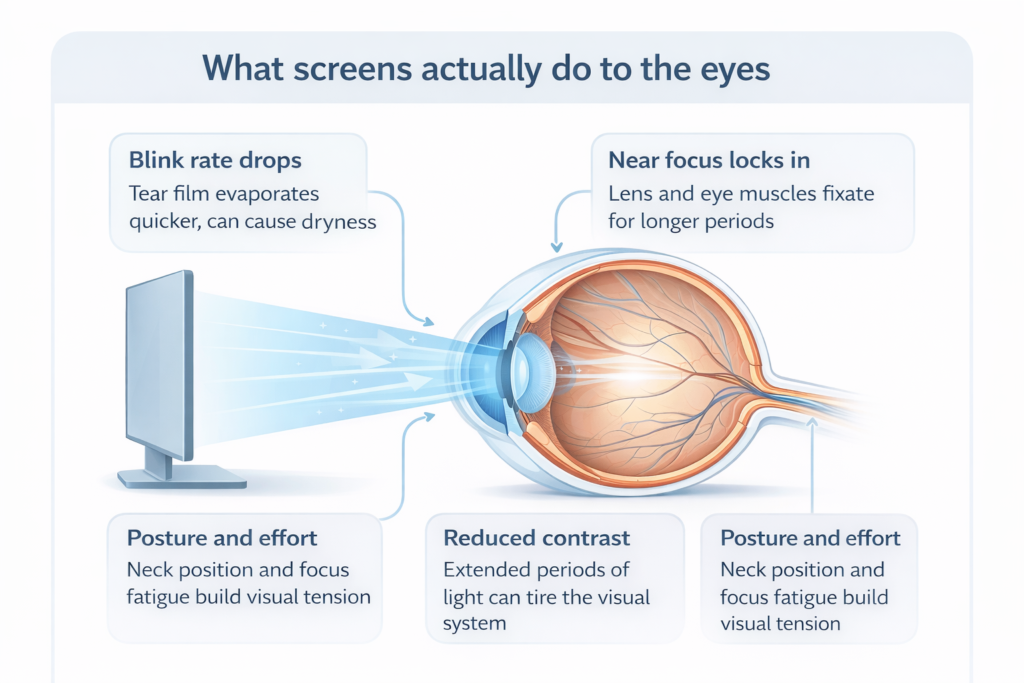
What screens actually do to the eyes
Screens do not typically harm the structure of healthy eyes. What they do affect is how the visual system functions.
When looking at a screen, blink rate drops significantly. The eyes focus at a fixed near distance for long periods, often without variation. Contrast, lighting, posture, and concentration all combine to place sustained demand on the visual system.
Over time, this can lead to fatigue, dryness, focusing strain, and reduced visual comfort. These changes are functional at first, but repeated exposure can cause them to become persistent rather than temporary.
Daily exposure: when symptoms reset overnight
For many people, early screen-related symptoms appear within a single day. After several hours of screen use, the eyes may feel heavy, dry, or slightly blurred. Refocusing from near to far can take longer, and bright lights may feel more uncomfortable than usual.
At this stage, symptoms often improve after rest or sleep. Vision feels normal again the following morning, which is why people rarely act on these early signs.
Daily symptoms are best seen as signals rather than problems. They suggest that the eyes are working harder than before, even if visual clarity remains good.
Daily exposure: what to look out for
| What you notice | What it often means | Helpful response |
|---|---|---|
| Eyes feel dry or gritty by late afternoon | Blink rate drops on screens; the tear film breaks up faster | Blink deliberately; check airflow and lighting; consider a dry eye review if frequent |
| Slight blur that clears after rest | Focusing system is fatigued from sustained near work | Vary distance; take brief refocus breaks; ensure screen is not too close |
| Headache after long screen sessions | Visual strain, posture tension, or an uncorrected prescription shift | Check ergonomics; consider a routine eye test if it repeats |
| Refocusing near to far feels slow | Visual system is “locked” at one distance for too long | Stand and look into distance; use the window as a refocus anchor |
Daily symptoms that settle overnight are common; the aim is to reduce strain before it becomes persistent.
Monthly exposure: when adaptation begins
Over weeks or months of regular screen use, the visual system starts to adapt. People may increase text size, adjust lighting, or hold devices further away without consciously realising why. Eye strain or headaches may become more frequent, particularly after long days.
Dryness can feel more persistent rather than situational. The eyes may no longer feel fully refreshed after sleep, and visual comfort during prolonged tasks can decline.
This is often the point where people assume their eyes are “just tired” or that they need stronger glasses. In reality, this phase reflects a shift from short-term fatigue to ongoing visual demand.
Monthly exposure: what to look out for
| What you notice | Why it matters | Helpful response |
|---|---|---|
| Dryness is no longer just “end of day” | Dry eye can become chronic if ignored; comfort and clarity both suffer | Book a dry eye assessment; adjust habits, lighting and airflow |
| You keep increasing text size | This can signal focusing strain or early near-vision change | Check distance and lighting; consider an eye test if it’s become a pattern |
| Headaches become predictable after screens | Often linked to focusing effort; sometimes a subtle prescription change | Routine exam plus ergonomic review; avoid “pushing through” |
| Eyes feel tired even after sleep | A sign strain is carrying over; your baseline comfort is dropping | Build breaks into the day; address dryness; test vision if it continues |
Monthly patterns often show adaptation; catching them early keeps options open and improves comfort.
Yearly exposure: when changes feel age-related
With sustained screen exposure over years, functional changes can begin to overlap with natural ageing processes. Focusing flexibility may reduce earlier than expected, particularly in people entering their late 30s or 40s. Sensitivity to glare and difficulty with night driving can also become more noticeable.
At this stage, it becomes harder to separate screen-related strain from age-related vision changes. Many people assume what they are experiencing is inevitable, when in fact earlier awareness could have preserved more options.
Long-term screen use does not cause presbyopia or ageing, but it can accelerate how soon these changes are felt and how strongly they affect daily life.
Yearly exposure: what to look out for
| What you notice | What it can indicate | Helpful response |
|---|---|---|
| Near work feels harder than it “should” | Focusing flexibility reduces with age; heavy screen use can make it feel earlier | Assessment helps clarify whether it’s presbyopia, strain, or both |
| Night driving becomes uncomfortable | Glare and contrast sensitivity changes can build over time | Book an eye exam; ask about glare, contrast and lens clarity checks |
| You’re relying on brighter light for reading | Often linked to age-related changes; can be amplified by long near-focus habits | Review near vision options; consider a structured plan for long-term comfort |
| Visual comfort limits work or enjoyment | A sign your baseline has shifted; worth exploring corrective options and eye health | Discuss suitability for modern solutions; laser or lens options may be relevant |
Yearly patterns are where people assume “this is just ageing”; an assessment can separate normal change from fixable strain.
What genuinely helps and what matters less
Many tools marketed for screen use focus on comfort rather than function. Blue light filters, for example, can reduce visual strain for some people, but they do not prevent focusing fatigue or dryness on their own.
What tends to make the biggest difference is variation. Changing viewing distance, improving posture, managing lighting, and allowing the eyes to shift focus regularly all reduce sustained demand. Blinking more consciously and addressing dry eye early can also improve comfort significantly.
Most importantly, understanding personal visual limits matters more than following generic rules. What feels manageable at 30 may not feel the same at 45, especially with long-term screen exposure layered on top.
When screen time becomes a reason to act
Screen use alone does not mean intervention is needed. However, when symptoms become persistent, when night driving is affected, or when visual comfort limits daily work or enjoyment, assessment becomes valuable.
Early assessment is not about committing to treatment. It is about understanding how the eyes are coping, what has changed, and which options remain available. For some, simple guidance is enough. For others, reducing dependence on glasses or addressing focusing issues becomes part of a longer-term plan.
Modern eye care increasingly views screen-related strain as one piece of a wider visual picture. The earlier that picture is understood, the more flexibility remains for the future.
Modern solutions for screen heavy lives
When screen time becomes part of daily life, the goal is not perfection. It is comfort, clarity, and a plan that fits how you actually live. For some people, better habits are enough; for others, modern vision correction can remove a constant layer of effort and visual strain.
Start with clarity, not assumptions
Screen strain often overlaps with subtle prescription changes, dry eye, or early near vision shifts. The first step is a thorough assessment, so you know whether the issue is comfort, focusing effort, or a correction problem that has been quietly building.
Reduce strain with the right foundations
For many people, the biggest improvement comes from treating the basics properly; dry eye support, better lighting, and sensible screen habits. When the surface of the eye is stable and comfortable, vision often feels clearer, and focusing becomes less demanding.
If correction is the issue, modern options can change everything
If the eyes are constantly working to compensate for blur, astigmatism, or near vision changes, screen time can feel harder than it should. Modern vision correction can remove that layer of effort; the aim is not just sharper vision, but a calmer visual experience.
The right choice depends on your prescription, eye health, lifestyle, and long-term plans; the goal is a solution that remains sensible as your eyes change over time.
A long-term plan beats quick fixes
Screen time is not a short phase for most people. The best outcomes come from a plan that fits your working life now, and still makes sense years later. Whether that involves guidance, correction, or a future focused approach, the aim is stable, comfortable vision with fewer compromises.
A modern approach to screen-heavy lives
Screens are not going away, and eyes do not need to suffer because of them. Awareness, not avoidance, is what protects long-term vision.
By recognising how screen exposure accumulates daily, monthly, and yearly, people can act earlier, adapt smarter, and make informed decisions rather than reactive ones. Often, the most important step is not changing habits overnight, but understanding when the eyes are asking for support.
The Screen Time Codex: Visual Impact Over Time
This codex summarises how screen exposure typically affects the eyes over time. Individual experience varies, but patterns tend to follow a recognisable progression.
| Exposure timeframe | Common visual effects | How it often feels | Sensible response |
|---|---|---|---|
| Daily screen use | Reduced blink rate, tear film instability, focusing fatigue, temporary blur, dryness | Eyes feel heavy or gritty by evening; refocusing feels slow; comfort returns after rest | Vary distance and posture; reduce glare; take short refocus breaks; monitor patterns |
| Monthly screen habits | Persistent dryness, headaches, comfort decline, slower refocusing, increased light sensitivity | You adapt without noticing; larger text, brighter screens, more squinting; symptoms linger | Routine eye exam; assess dry eye; review ergonomics and screen settings; avoid pushing through |
| Yearly exposure | Reduced focusing flexibility, glare sensitivity, night driving discomfort, baseline fatigue | Changes feel age-related or permanent; comfort limits work or enjoyment; recovery is slower | Full assessment to separate strain from age-related change; plan long-term visual care options |
Device + Environment Codex: What makes screen strain worse
Screen comfort is not just about time. The type of screen, how it is set up, and the lighting around it can change how hard your eyes have to work.
| Factor | Why it matters | What people often notice | Quick improvement |
|---|---|---|---|
| Screen size vs distance | Small screens used close up increase focusing demand and reduce blink rate | Quick fatigue on phones; more squinting; slow refocus when looking up | Increase text size; increase distance; consider a larger display for long sessions |
| Pixel density and text rendering | Crisp text reduces micro-squinting; poor rendering forces constant “effort focus” | Eyes feel strained even when the text looks readable; headaches after reading | Increase font size slightly; use a clean font; improve contrast; avoid low resolution scaling |
| Brightness set too high or too low | Over-bright screens cause glare and squinting; under-bright screens increase strain | Burning sensation; forehead tension; feeling “overloaded” visually | Match screen brightness to room lighting; reduce harsh contrast between screen and background |
| Refresh rate and motion handling | Smoother refresh reduces perceived flicker and visual effort for some people | Fatigue during scrolling; “visual tension”; discomfort with fast movement on screen | Use a higher refresh rate if available; reduce motion effects where possible |
| PWM flicker and backlight behaviour | Some screens dim using flicker; sensitive users can feel strain without realising why | Headache, nausea, fatigue, or “wired” eyes that do not settle quickly | Try a different device; adjust brightness range; use external monitors for long work sessions |
| LCD vs OLED vs LED backlights | Different display types handle contrast, brightness and flicker differently; comfort varies person to person | One screen feels fine; another causes fatigue quickly even with the same workload | Test what suits you; do not assume all screens feel the same; consider external monitors for stability |
| Blue-rich lighting and colour temperature | Cool white lighting can increase perceived harshness; especially in the evening | Eyes feel tight; glare sensitivity rises; you prefer dim rooms at night | Use softer, warmer ambient lighting in the evening; avoid intense overhead glare |
| LED bulbs, glare and reflections | Strong point-source LEDs create glare; reflections force constant micro-adjustments | Squinting, watering eyes, headaches; discomfort that improves when lighting changes | Diffuse lighting; reposition lamps; reduce reflections; avoid strong lights directly behind screens |
| Contrast settings and dark mode | Some people do better with dark mode; others find it increases halation and glare around text | Letters appear to glow; text looks less crisp; eyes feel unsettled after reading | Try both modes; reduce brightness; choose softer backgrounds rather than pure white or pure black |
| Viewing angle and posture | Poor posture increases neck tension and reduces blinking; an awkward angle increases effort focus | Neck ache with eye strain; headaches; fatigue that improves when you move around | Raise the screen; keep a comfortable viewing distance; support posture for long sessions |
Screen strain is usually a combination of exposure time, focusing demand and environment. Small changes can make a noticeable difference; if symptoms persist, an eye assessment helps clarify what is actually driving the discomfort.